Introduction
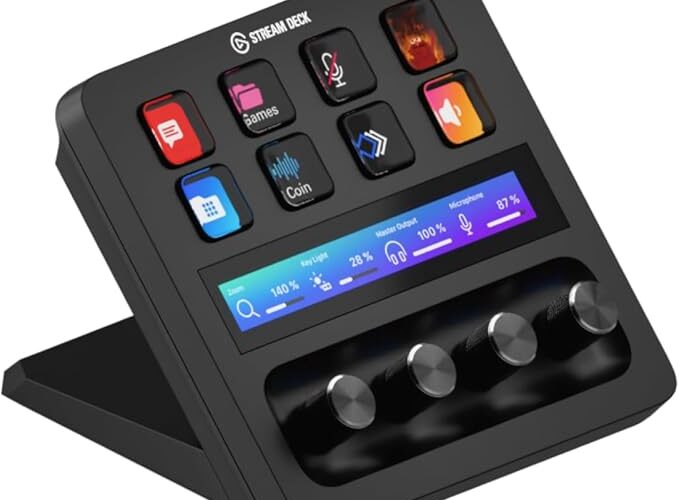
Take your streaming, content creation, and studio workflow to the next level with the Elgato Stream Deck + Audio Mixer and Studio Controller. Designed for creators, streamers, podcasters, musicians, and professionals, this versatile desktop controller combines customizable LCD keys, rotary dials, and a touch-sensitive strip to provide convenient control over your digital workspace.
Whether you’re managing audio levels during a livestream, switching scenes while recording, adjusting settings in creative software, or simplifying everyday computer tasks, the Stream Deck + puts essential controls within easy reach. Its combination of tactile controls and customizable software makes it a powerful addition to a modern creative setup.
Customizable LCD Keys for Instant Control
One of the main features of the Elgato Stream Deck + is its eight customizable LCD keys. Each key displays an individual icon or label, allowing you to identify and activate assigned actions quickly.
Using the Stream Deck application, you can customize these keys to perform a wide variety of tasks, including launching applications, switching streaming scenes, muting microphones, controlling music playback, and activating keyboard shortcuts.
The keys can also be organized into profiles, folders, and pages, allowing you to create different layouts for specific applications or activities.
This flexibility makes the Stream Deck + useful for both simple everyday tasks and more advanced production workflows.
Four Rotary Dials for Precise Adjustments
The Stream Deck + features four multifunctional rotary dials that provide a tactile way to adjust settings. Unlike controls that require repeated mouse clicks, the dials allow you to make adjustments by simply turning them.
Depending on the software and configuration, they can be assigned to functions such as:
- Adjusting microphone and application volume.
- Controlling audio mixing levels.
- Changing brightness and other system settings.
- Adjusting creative software parameters.
- Scrubbing through video and audio timelines.
- Modifying supported plugin and production settings.
The dials can also support different actions when pressed, depending on the assigned configuration. This makes them especially useful for creators who frequently adjust multiple settings during recording, streaming, or editing.
Touch-Sensitive Control Strip
Positioned above the rotary dials, the touch-sensitive strip adds another layer of control to the device. It works alongside the keys and dials to provide visual feedback and convenient interaction with supported functions.
Users can swipe across the strip, tap supported controls, and interact with compatible workflows. Depending on the selected plugin or profile, the strip can display information and provide access to additional adjustments.
Combined with the rotary dials, this touch interface helps create a more intuitive control experience for audio management, creative applications, and studio tasks.
Convenient Audio Mixing and Management
For streamers, podcasters, and other content creators, managing multiple audio sources can be challenging. The Elgato Stream Deck + helps simplify this process by providing direct access to supported audio controls through its keys, dials, and compatible software integrations.
You can configure controls for microphone levels, desktop audio, music playback, and other supported audio sources. Dedicated keys can also be assigned to mute or unmute devices and trigger other audio-related actions.
With compatible applications and plugins, the Stream Deck + can help you manage your audio workflow without repeatedly navigating software menus.
It is important to note that the device primarily acts as a hardware controller for software and compatible equipment; it does not replace a standalone audio interface or microphone preamp.
Powerful Streaming and Content Creation Features
The Stream Deck + is designed to make live production and content creation more efficient. Its customizable controls allow you to trigger multiple actions quickly while remaining focused on your content.
For example, you can configure a key to switch scenes in OBS Studio, start a recording, activate an audio effect, or trigger a combination of supported actions.
Its capabilities are useful for:
- Live streaming: Switch scenes, manage sources, and trigger alerts.
- Podcasting: Control microphones, audio levels, and recording workflows.
- Video production: Access editing shortcuts and control supported timeline functions.
- Music production: Adjust compatible software parameters and trigger assigned actions.
- Content creation: Launch applications, automate repetitive tasks, and organize workflows.
Compatibility and available functions depend on the applications, plugins, and software configurations being used.
Easy Customization with Stream Deck Software
The Stream Deck application allows users to assign actions to individual keys and dials through a visual interface. Actions can be configured using supported plugins, keyboard shortcuts, and other available integrations.
The software also supports custom icons, profiles, folders, and multi-action sequences. These features make it possible to create a control layout suited to your individual needs.
For example, a streamer can create a profile for broadcasting, another for video editing, and another for everyday computer use. Smart Profiles can automatically switch layouts when supported applications become active.
This customization makes the Stream Deck + adaptable to different workflows without requiring users to learn complicated hardware programming.
Modern Design for a Professional Workspace
The Elgato Stream Deck + features a compact desktop design that fits naturally into a streaming desk, podcast studio, or creative workstation.
Its combination of physical rotary dials, illuminated LCD keys, and a touch-sensitive strip gives the device a modern, professional appearance while keeping essential controls accessible.
The tactile controls can also make repetitive tasks more comfortable by reducing reliance on mouse clicks and keyboard shortcuts.
Whether used as part of a gaming setup or a professional production environment, the device provides a centralized control surface that can help keep a workspace organized.
Who Is the Elgato Stream Deck + For?
The Stream Deck + is suitable for a wide range of users who want more direct control over their digital tools.
- Streamers: Manage broadcasts, scenes, and audio controls.
- Podcasters: Organize recording tasks and control supported audio software.
- Video editors: Access shortcuts and adjust compatible editing parameters.
- Musicians and producers: Control supported music applications and plugins.
- Content creators: Automate repetitive actions and improve workflow efficiency.
- Professionals: Simplify presentations, meetings, and frequently used computer tasks.
Its flexibility makes it particularly valuable for people who regularly work across several applications and want convenient access to their most-used commands.
Conclusion
The Elgato Stream Deck + Audio Mixer and Studio Controller combines eight customizable LCD keys, four multifunctional rotary dials, and a touch-sensitive control strip in a versatile desktop device.
Designed for streaming, audio management, creative production, and everyday productivity, it provides customizable access to frequently used actions while helping simplify complex workflows. Its software integrations and flexible controls allow users to tailor the device to their specific applications and working habits.
For streamers, podcasters, musicians, video editors, and other digital creators, the Elgato Stream Deck + offers a practical way to bring essential controls together in one accessible and customizable studio controller.
VIEW ON AMAZON